Chess Duels Tools & Checklists
Controls, UI panels, daily goals workflow, and a post-game review checklist—practical, not a live calculator.
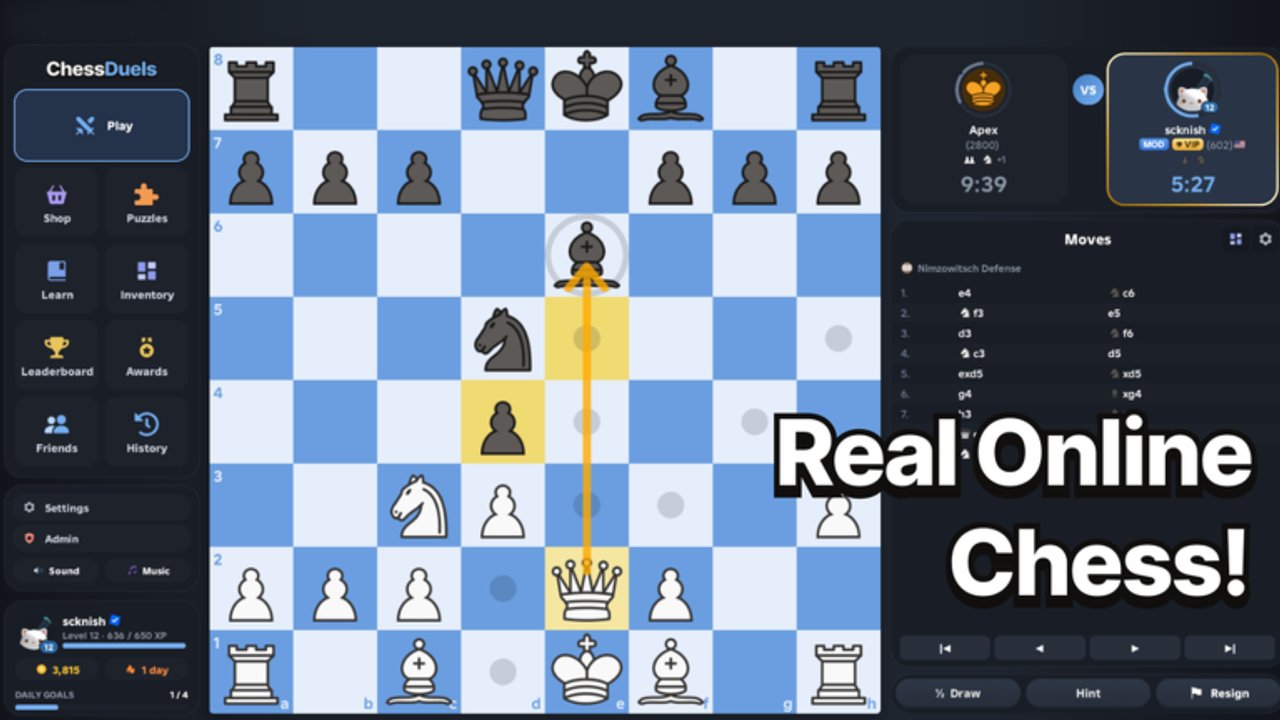
This Tools page is a practical field manual for Chess Duels on Roblox—not a live rating calculator or engine. Use it to learn how pieces move on screen, how the main UI panels fit together (Play, Puzzles, Learn, Review, Customize), how to clear daily goals without derailing your rating plan, and how to run a short review checklist after every serious game. Pair it with Getting Started, Time Controls, Climb Rating, and the Players Hub when you are ready to compete.
Chess Duels launched on 27 October 2026 with a full competitive loop: rated Bullet, Blitz, and Rapid, thousands of puzzles, lessons, cosmetics, daily goals, and a global leaderboard. The tools below are the ones you actually touch every session.
Controls overview — moving pieces cleanly
On desktop, most players click a piece and then click a destination square, or click-and-drag the piece onto the target. Both methods must respect legal moves; illegal targets simply will not stick. On touch devices, tap to select, tap again to move—avoid hovering your finger so long that the camera or Roblox gesture steals focus.
Practical control tips:
- Confirm the side to move. If it is not your turn, clicks should do nothing useful; do not spam the board and burn attention.
- Use premoves only when you understand the risk. In Bullet and fast Blitz, premoves save clock but can auto-play into blunders if the opponent chooses a different check.
- Keep the camera stable. Unnecessary zooming mid-combination costs seconds you need for calculation.
- Close overlapping Roblox menus (players list, chat popouts) before the clock hits zero in time scrambles.
- Know resign / draw / offer UI so you do not misclick during a lost position—or resign a won one.
If a patch changes click targets or drag sensitivity, re-test in an unrated game before a rated climb session. Track UI changes on the Updates Hub.
UI panels — Play, Puzzles, Learn, Review, Customize
Think of the Chess Duels shell as five jobs:
Play
The Play panel is matchmaking. Choose Bullet, Blitz, or Rapid, decide rated versus casual when the option exists, and queue only when you have ten quiet minutes (or the full Rapid block). Jumping modes mid-tilt is the fastest way to confuse your instincts. Deep mode advice lives in Time Controls.
Puzzles
Puzzles train tactics without rating risk. Solve a short set as a warm-up, or use a longer set when you are too tired for rated play but still want reps. Track themes you miss—forks, pins, back-rank mates, deflection—and revisit them the next day. Volume helps daily goals; accuracy helps your real games.
Learn
Lessons structure ideas that puzzles alone will not teach: opening principles, basic endgames, and recurring patterns. Complete lessons when a daily goal asks for them, but also when Review shows the same mistake twice in one week. Lessons are study tools, not a substitute for playing humans.
Review
Review is the most important “tool” for long-term climb. After a finished game, open Review and scrub to the first moment the evaluation swung. Ask three questions: Was it an opening trap? A calculation miss? A time-pressure panic? Write one sentence you will remember next session. Ethical climbers live here; see Climb Rating and Players.
Customize
Customize covers cosmetics—boards, pieces, and flair. Change looks when you are calm, not during a losing streak. Cosmetics never alter ratings. If the shop rotates after a patch, confirm prices on join and skim Updates before spending Robux.
Daily goals checklist workflow
Daily goals reward healthy activity. Treat them as a menu, not a mandate to play tilted rated games until every box is green.
Suggested workflow:
- Open goals first after joining so you know whether today emphasizes puzzles, lessons, or match count.
- Warm up with puzzles or a lesson if those boxes are open—cheap progress before the clock matters.
- Play a planned rated block aligned with your climb mode; do not pad goals with random Bullet if you are a Rapid main unless you enjoy it.
- Finish remaining safe goals (extra puzzles, a short lesson) after the rated block so fatigue hits low-stakes tasks.
- Stop when stop rules hit even if one cosmetic goal remains—tomorrow’s goals reset; your rating does not need revenge games.
This workflow keeps cosmetics and awards aligned with improvement. Awards on the Players Hub mean more when they come from clean habits.
Post-game review checklist
Run this list after every rated game you care about (and after painful casual losses):
- Breathing room — thirty seconds away from rematch so emotion settles.
- Open Review — jump to the swing move, not only the final mate.
- Label the error type — opening, tactics, endgame, or clock.
- Find the missed candidate — what check, capture, or threat did you ignore?
- One actionable note — example: “In this Sicilian line, always ask if Nb5 hits c7.”
- Optional puzzle echo — solve two puzzles that share the theme before queuing again.
- Queue decision — continue, switch to puzzles, or end the session per your stop rule.
Skipping Review turns Chess Duels into coin-flip entertainment. Using it turns the same games into a coach.
What this page is not
- Not a stockfish-on-Roblox engine.
- Not a live Elo calculator or cheat sheet for unfair assistance.
- Not a replacement for official patch notes—cross-check Updates.
- Not a codes redeemer—see Codes when verified strings exist.
Related guides to open next
- Getting Started — first-hour path into Chess Duels.
- Time Controls — Bullet vs Blitz vs Rapid habits.
- Climb Rating — structured ladder plan.
- Tier List — idea and opening priorities for the current meta.
- Players Hub — leaderboard ethics and consistency.
- Guides Hub — full tutorial map.
Master the panels, protect your clock with clean controls, clear daily goals on purpose, and review every serious game. Those four habits are the real “tools” that raise your Chess Duels rating on Roblox.
Frequently Asked Questions
Quick answers to common Chess Duels questions.
Is this a live Chess Duels calculator?
No. This Tools page is a controls and checklist guide only. It does not compute ratings or suggest engine moves.
How do I move pieces in Chess Duels?
Click or drag pieces to legal squares on desktop; tap to select and tap to move on touch. Keep overlays closed in time scrambles so gestures stay accurate.
What order should I use the panels?
Typical flow: check daily goals, warm up in Puzzles or Learn, queue from Play, then open Review after each serious game. Use Customize between sessions. Details above; fundamentals in Getting Started.
How do daily goals fit a rating climb?
Clear safe goals first or last, and keep rated blocks focused on one time control. See Climb Rating and Players for ethical ladder habits.